
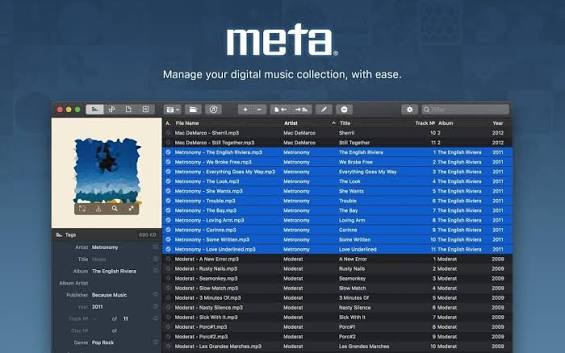
Select a folder or a set of tracks, and the sidebar becomes a shared editor: changes to title, artist, album, genre, and other fields apply across the selection immediately, with no separate save step for each file. That model fits DJs, collectors, and podcasters who fix hundreds of tracks after a vinyl rip, Bandcamp dump, or store download. Specialized controls help with awkward fields—BPM, ISO 8601 dates, and multiline lyrics or comments—so you are not fighting free-text formatting rules by hand.
Artwork follows the same batch idea. Drag covers onto a selection, then crop, scale, or compress images so embedded art stays usable without bloating file size. Custom sidebar layouts let you keep only the fields you need for classical, publishing, podcasts, or everyday albums and switch layouts without rebuilding the panel each session.
Overview of Meta for macOS
This powerful tag editor helps you with managing a digital music collection and saves you time when you rip vinyls or download music from 3rd party stores.
It allows you to customize the layout of tags you want to edit in the sidebar. Quickly switch between configurations like Standard, Extended, Publishing, Classical, Podcasts, etc., depending on your current needs.
NBE Software Meta supports all popular audio formats such as mp3, mp4, m4a, m4b, m4v, aiff, wav, flac, ogg, oga, opus, spx, dsf, dsdiff, and writes metadata formats ID3v1, ID3v2 (v2.3, v2.4), MP4, Vorbis, INFO and APE Tags.
Features of Meta for macOS
- Batch Editing
- Pattern-Based Conversions
- Album Cover Management
- File Management
- iTunes Friendly
- Customizable User Interface
- Fast, Clean, & Reliable
Technical Details and System Requirements
- OS X 10.10 or later
- Apple Silicon or Intel Core processor