
Free download DockPops for MacOS Latest full version – Organize your Dock like your iPhone.

Free Download Applacat DockPops full version standalone offline installer for macOS. It is a simple and powerful way to make your Dock more useful by turning it into a smarter app launcher. It helps you keep your favorite apps, files, and folders organized without cluttering your workspace. Instead of searching through different locations, you can create clean groups that are always ready when you need them.
Overview of DockPops for macOS
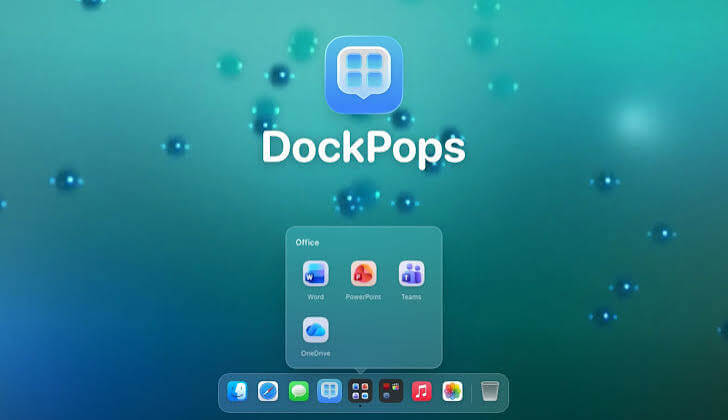
This tool gives users a practical way to transform their Dock into a more organized command center. Instead of placing every app, folder, or document separately, you can collect related items into named Pops and switch between groups whenever needed.
The idea is simple: your Dock becomes less like a crowded shelf and more like a well-arranged toolbox. You can create groups for work, creativity, entertainment, or personal tasks and quickly reach what matters most. The app blends naturally with macOS, making the experience feel familiar from the beginning.
A Smarter Way to Organize Your Dock
Your Dock is one of the most frequently used parts of macOS, but it can become messy over time. This tool solves that problem by giving you a structured approach to organizing your most important items.
You can arrange apps, files, and folders into named groups that match your workflow. Whether you need a collection for professional projects or a set of tools for creative work, everything stays easy to find.
Swipeable App Groups in Your Dock
One of the standout features is the ability to use swipeable groups directly from your Dock. Instead of opening multiple folders or searching manually, you can move between organized collections quickly.
These groups function like small spaces within your Dock, where related items live together. This makes switching between different activities faster and keeps your main workspace clean.
SmartyPops for Automatic Suggestions
The smart suggestion system helps you create useful groups without spending too much time arranging everything manually. It can recommend combinations based on your apps and usage patterns.
This feature is helpful when you want a more organized setup but do not want to spend hours creating categories yourself. It acts like a helpful assistant that prepares a cleaner structure for your workflow.
Native macOS Experience
The app is built specifically for macOS, which means it follows the design language and performance expectations of the platform. It feels natural alongside other Mac applications. The lightweight design helps maintain a smooth experience while giving you extra control over your Dock. You get more organization without adding unnecessary complexity.
Privacy-Focused Design
Privacy matters when using productivity tools. This application focuses on keeping your information protected by operating securely on your Mac. It does not rely on unnecessary tracking methods, allowing you to organize your workspace with confidence. Your personal setup stays focused on your device.
Fully Sandboxed Operation
Security is an important part of modern applications. The sandboxed design helps create a safer environment by limiting unnecessary access. This approach provides peace of mind while still allowing you to enjoy better organization and faster access to your favorite items.
Custom Named Groups
Everyone works differently, and custom groups make it easier to build a setup that matches your habits. You can create names that make sense for your daily routine. For example, you can separate creative tools, communication apps, research materials, or frequently used folders into different collections.
Fast Access to Apps, Files, and Folders
Finding important items should not interrupt your workflow. The organized groups provide a faster route to frequently used resources. Instead of searching through multiple places, you can open what you need with fewer steps and keep your attention focused.
Cleaner Desktop Workflow
A cluttered workspace can slow you down. By keeping your Dock organized, you can create a calmer and more productive environment. The app helps reduce visual noise while keeping useful resources close at hand. It is like having a neatly arranged desk where everything has its own place.
Simple Setup and Easy Management
You do not need advanced technical knowledge to use the app. The setup process is designed to be straightforward, allowing you to start organizing quickly. Managing groups is also simple, so you can adjust your workspace whenever your needs change.
Better Productivity for Daily Tasks
Small improvements can make a big difference in daily computer use. Faster access, better organization, and reduced clutter can help you complete tasks more efficiently. This tool is especially useful for users who frequently switch between different projects and need a flexible workspace.
System Requirements
- macOS 14 or later
- Apple Silicon or Intel Core processor
- Internet connection for downloading the application
- Available storage space for installation
- Standard user permissions for setup
- Apple Silicon or supported Mac hardware recommended for the best experience
FAQs
Q: What is it used for?
A: It helps organize apps, files, and folders into convenient groups inside your Dock for faster access.
Q: Is it designed only for macOS?
A: Yes, it is created specifically for macOS users and follows the native Mac experience.
Q: Can I create my own groups?
A: Yes, you can organize items into named groups that match your personal workflow.
Q: Does it track my activity?
A: No, the app focuses on privacy and does not use tracking features to monitor your activity.
Q: What are SmartyPops?
A: SmartyPops are smart suggestions that help you create useful app groups more easily.
Q:Is the application difficult to learn?
A: No, it has a simple design that makes setup and daily use easy for most users.
Q: Can I organize folders and files as well as apps?
A: Yes, the organization system supports apps, files, and folders so you can build a complete workspace.
Conclusion
DockPops is a cleaner, smarter, and more organized way to manage your digital workspace. With swipeable app groups, named collections, smart suggestions, and a privacy-focused design, it turns the Dock into a more powerful everyday tool. If you want a simple way to reduce clutter and improve your workflow, this app provides a practical solution that fits naturally into your Mac routine.