
Free download Nextcloud Desktop for MacOS Latest offline Installer – Open source content collaboration platform.

Free Download Nextcloud Desktop, the latest standalone offline installer for macOS. It gives users a powerful toolset to securely manage, sync, and share their files.
Overview of Nextcloud Desktop for macOS
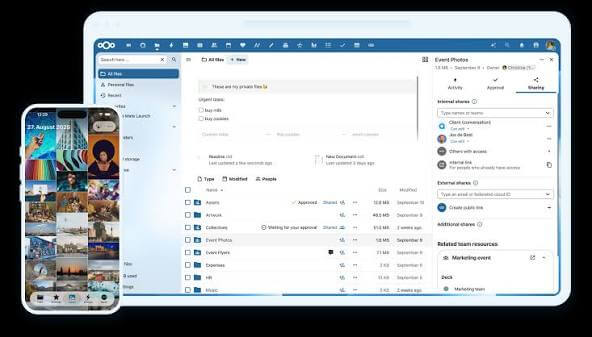
It is a cutting-edge file management and collaboration tool that seamlessly integrates with the Nextcloud platform. This application offers a robust suite of features, including cross-platform syncing, end-to-end encryption, collaborative editing, and intuitive file versioning.
Features of Nextcloud Desktop for macOS
- Cross-Platform Syncing: It ensures a seamless experience across multiple platforms, allowing users to sync their files effortlessly between their devices and other supported systems.
- End-to-end Encryption: End-to-end encryption protects your files from unauthorized access, providing peace of mind regarding sensitive data.
- Collaborative Editing: The collaboration features empower teams to work on documents in real-time, fostering a collaborative environment that enhances productivity.
- Intuitive File Versioning: It automatically saves and tracks different versions of your files, allowing you to roll back to previous states if needed.
- Effortless File Sharing: It provides a simple yet powerful interface for securely sharing files with colleagues, friends, or family.
- Integrated Calendar and Contacts: It integrates seamlessly with calendar and contact functionalities, offering a holistic productivity suite for users.
- Advanced Search Functionality: Find your files with ease using advanced search capabilities. Effortlessly locate documents, photos, or any other file types within your Nextcloud instance.
- Customizable Notifications: Stay informed about changes and updates with customizable notifications. Tailor notifications to your preferences, ensuring you’re always in the loop.
- Automatic Photo and Video Upload: You can automatically upload photos and videos from your macOS device to your Nextcloud instance, ensuring your memories are securely backed up.
Technical Details and System Requirements
- macOS 12.0 or later
FAQs
Q: Can I access it offline?
A: Yes, it supports offline access to your files. Any changes made offline will be synchronized once you are back online.
Q: How secure is the tool?
A: It prioritizes security, offering end-to-end encryption for file storage. Users can take advantage of robust security measures to protect their data.
Conclusion
It is a versatile and powerful tool that enhances file management, collaboration, and productivity. With its array of features, seamless syncing capabilities, and commitment to security, it is a valuable asset for users seeking a reliable and user-friendly solution for their file management needs. Whether you’re an individual user or part of a team, this tool brings efficiency and convenience to the forefront, making it a compelling choice for users needing a comprehensive cloud-based solution.