
Free download Shotcut for MacOS Latest offline Installer – An open source, cross-platform video editor.
Free Download Shotcut latest offline installer for macOS. It is a simple and user-friendly video editor that can help you adjust and retouch videos with just a few clicks of your mouse.
Overview of Shotcut for macOS
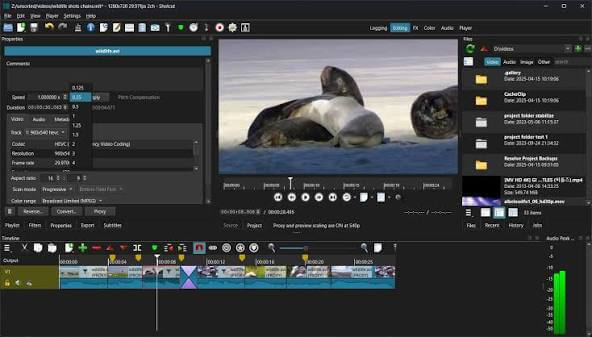
Shotcut is a simple and user-friendly video editor that offers a series of features and functions to help you adjust and retouch your favorite movies with just a few clicks of your mouse. It is a feature-rich and accessible video editing software suitable for all skill levels. Its intuitive interface, comprehensive format support, advanced audio editing, and flexible export options make it an excellent choice for creating professional videos.
Features of Shotcut for macOS
- Supports oodles of audio and video formats and codecs thanks to FFmpeg (or libav as-built)
- Supports many image formats such as BMP, GIF, JPEG, PNG, SVG, TGA, and TIFF, as well as image sequences
- No import required – native editing
- Frame-accurate seeking for many formats
- Multi-format timeline: mix and match resolutions and frame rates within a project
- Network stream playback (HTTP, HLS, RTMP, RTSP, MMS, UDP)
- Frei0r video generator plugins (e.g., color bars and plasma)
- Blackmagic Design SDI and HDMI for input and preview monitoring
- JACK transport sync
- Deinterlacing
- Detailed media properties panel
- Recent files panel with the search
- Drag-n-drop files from the file manager
- Save and load trimmed clip as MLT XML file
- Load and play complex MLT XML files as a clip
- Audio signal level meter
- Volume control
- Scrubbing and transport control
- Flexible UI through dock-able panels
- Encode/transcode to a variety of formats and codecs thanks to FFmpeg (or libav as-built)
- Capture (record) SDI, HDMI, webcam (V4L2), JACK, PulseAudio, IP streams, X11 screen
- Stream (encode to IP) files and any captured source
- Batch encoding with job control
- Create, play, edit, save, load, encode, and stream MLT XML projects (with auto-save)
- Unlimited undo and redo for playlist edits, including a history view
- Connect to Melted servers over MVCP TCP protocol
- Control the transport playback of Melted units
- Edit Melted playlists, including support for undo/redo
- OpenGL GPU-based image processing
- Multi-core parallel image processing (when not using GPU and frame-dropping is disabled)
- Video filters: Blur, Color Grading, Crop, Diffusion, Glow, Invert Colors, Mirror, Opacity, Rotate, Saturation, Sepia Tone, Sharpen, Size and
- Position, Stabilize, Text, Vignette, Wave, White Balance
- Audio filters: Balance, Copy Channel, Downmix, Gain, Normalize, Pan, Swap Channels
- 3-way (shadows, mids, highlights) color wheels for color correction and grading eye dropper tool to pick neutral color for white balancing
- HTML5 (sans audio and video) as video source and filters
- Leap Motion for jog/shuttle control
- DeckLink SDI keyer output
- UI themes/skins: native-OS look and custom dark and light
- Control video zoom in the player: fit viewable area (default), 50%, original (100%), and 200%
- Multitrack timeline with thumbnails and waveforms
- Thumbnail and waveform caching between sessions
- Audio mixing across all tracks
- video compositing across video tracks
- Trimming (on a timeline)
- Append, insert, overwrite, lift, and delete (ripple) editing on the timeline
- 3-point editing
- External monitoring on an extra system display/monitor
- Fade in and out the audio and fade video from and to black with easy-to-use fader controls on the timeline
- Cross-fade audio and video dissolve transitions easily by overlapping shots on the same track of the timeline
- Video wipe transitions: bar, barn door, box, clock (radial), diagonal, iris, matrix, and custom gradient image
Technical Details and System Requirements
macOS 10.12 or later
FAQs
Q: Is Shotcut available for free?
A: Yes, Shotcut is open-source software available for free. You can download it directly from the official website.
Q: Can Shotcut handle 4K video editing?
A: Yes, Shotcut supports 4K video editing. However, the performance may vary depending on your system specifications.
Q: Can I add custom filters or effects to Shotcut?
A: Shotcut allows you to create and add custom filters using its built-in OpenGL Shading Language (GLSL) support. This feature enables you to enhance the software’s capabilities according to your requirements.